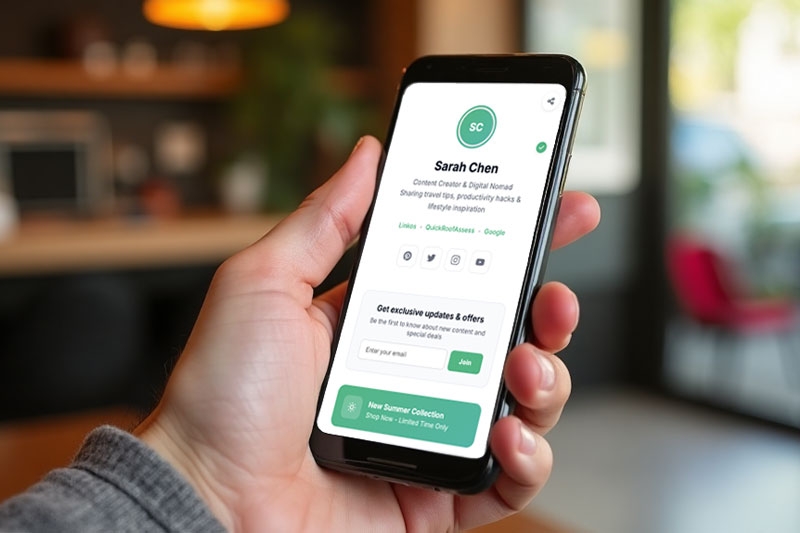
You've seen them everywhere.
Instagram bio. TikTok profile. Twitter/X header. Even on LinkedIn and Pinterest.
A simple link that says "Link in bio" or "Shop here" or "All my links."
And when you tap it, you land on a clean page filled with buttons: YouTube channel, shop, newsletter, podcast, latest video, press kit, maybe a few affiliate links.
For creators and small business owners, this has become the standard way to send followers somewhere—anywhere—without fighting platform restrictions.
It works. It's simple. And it's changed how people navigate from social media to the rest of the internet.
But here's the thing: getting the click is only half the battle.
What a Link-in-Bio Tool Actually Does
A good link-in-bio platform helps you:
- Put all your important links in one mobile-friendly page
- Customize the look with your brand colors, images, even video backgrounds
- Track how many people click each link, where they're from, and what device they use
- Use AI to write a better bio or optimize your link order
- Add a blog, email signup, or even developer tools for automation
It's a central hub. A digital business card that never runs out of space.
For creators, that means directing followers to their latest video, podcast episode, or merch store.
For businesses, it means sending potential customers to their online store, booking page, or portfolio.
And for many, it's enough.
But for businesses that actually sell products—physical goods, services, digital downloads—the link-in-bio page often stops short.
The Missing Piece: What Happens After the Click?
Let's follow a real customer journey.
A potential buyer is scrolling through Instagram. They see your post—a beautiful product shot, a behind-the-scenes reel, a customer testimonial.
They're interested. They tap the link in your bio.
Your link-in-bio page loads. It's clean, on-brand, and professional. They see buttons like:
- "Shop our collection"
- "View latest arrivals"
- "Contact us"
- "FAQs"
They tap "Shop our collection."
And then... they land on your website. Or maybe an external store. Or maybe just a contact form.
But here's where the friction often starts.
- The website loads slowly on mobile.
- They have to create an account before they can see prices.
- The product catalog is hard to navigate.
- They find what they want, but then they have to DM you, wait for a reply, type out their order manually, and hope you don't mix up their choices.
This is the gap.
Your link-in-bio did its job—it got them to your page. But your sales process lost them somewhere between "interested" and "paid."
Two Tools, Two Jobs
The smartest businesses and creators are starting to think differently.
They realize that a link-in-bio page and a product catalog serve different purposes—and both are needed.
Link-in-bio page:
- Shows everything you do (content, socials, shop, newsletter, etc.)
- Sends visitors to different destinations
- Tracks which links get the most attention
- Builds your brand hub
Product catalog:
- Shows only your products or services
- Allows browsing without leaving the page
- Lets customers select items and send orders directly via WhatsApp or other messaging apps
- Captures orders cleanly, without back-and-forth typing
One is a directory. The other is a checkout counter.
They work best together.
The VCard/Biolink Feature That Displays Products
This is where things get interesting for businesses that actually sell things.
Some link-in-bio tools now offer more than just buttons. They offer product display.
Instead of just linking to your Shopify store or Etsy page, you can show your actual catalog—right there on your bio page.
WhatsMenu, for example, includes a vCard / biolinks feature that lets you:
- Create a professional profile page with your business info, contact details, and social links
- Display your products or services with images, descriptions, and prices
- Let customers add items to a cart directly on the page
- Send the entire order as a clean WhatsApp message with one tap
- Update your catalog instantly—no website changes needed
It's like having a link-in-bio page that doesn't just point to your shop—it is your shop.
For businesses that rely on WhatsApp or messaging apps for sales, this closes the loop completely.
A Real Example
Imagine you sell handmade jewelry. Your Instagram is full of beautiful photos. People comment "How to order?" constantly.
Old way:
- Link in bio goes to your website
- Customer clicks, browses, finds a necklace they like
- They screenshot it, message you on WhatsApp, type "How much is this and is it in stock?"
- You reply "RM89, yes in stock"
- They ask "Can I get it in gold?"
- You say "Yes, add RM10"
- They say "Okay, bank transfer?"
- You send account details
- They pay, you confirm
- Exhausting.
Better way with a product-focused bio link:
- Link in bio goes to your WhatsMenu vCard page
- Page shows your business name, contact info, and social links at the top
- Below, a clean grid of all your jewelry—images, names, prices
- Customer taps the necklace they want, selects "gold" option, adds to cart
- They tap "Order via WhatsApp"
- A complete message appears: "Necklace – Gold – RM99 – 1 piece. Total RM99. Shipping to KL."
- They hit send. You receive it.
- You reply "Got it, will pack today." Done.
That's the difference.
One link. One page. No website required. No typing back-and-forth. No lost sales because the customer got tired of waiting.
Who Needs a Product-Focused Bio Link?
Not every link-in-bio user sells physical products. For creators who just want to share content, a standard tool like Linkos is perfect.
But if you fall into any of these categories, a product-display bio link can be a game-changer:
- Small product businesses – jewelry, clothing, handmade goods, art
- Food and beverage – cakes, catering, meal prep, local delivery
- Service providers – salons, home cleaning, tutoring, event planning
- Wholesale or B2B – product catalogs for buyers
- Anyone taking orders via WhatsApp or Messenger
For these businesses, the link in bio isn't just a directory. It's a sales tool.
Building Your Complete Bio Strategy
Here's how the smartest businesses are structuring their social media presence in 2026:
Step 1: Choose your primary bio link tool.
If you need to showcase multiple content types (YouTube, podcast, blog, shop), use a platform like Linkos to build your hub. Customize it. Track your clicks. A/B test your link order.
Step 2: Make your shop link point to a product catalog.
Instead of sending people to a slow website or a generic "contact us" page, send them to a catalog page that displays your products and lets them order directly.
Step 3: Remove friction from the order process.
The fewer steps between "I want this" and "I paid for this," the more sales you'll close. A one-tap WhatsApp order is about as frictionless as it gets.
Step 4: Track everything.
See which social platform sends the most traffic. Which products get the most views. Which times of day people order. Then adjust.
The Bottom Line
A link-in-bio page is essential. It's your digital front door. It tells people who you are and where to find you.
But for businesses that actually sell things, a front door isn't enough. You need a checkout counter right there in the same room.
That's why product-focused bio links are becoming the new standard for small businesses on social media.
Your Instagram or TikTok gets them curious.
Your link-in-bio page gets them to your hub.
Your product catalog gets them to buy.
Three pieces. One seamless journey.
P.S. This is exactly why WhatsMenu includes a vCard/biolink feature that displays products. It's not just a list of links—it's a mobile-friendly catalog with images, prices, and one-tap WhatsApp ordering. Perfect for businesses that want to turn their bio link into a real sales channel. You put up your products. Customers browse and order. No middlemen. No headaches. 😊