TL;DR. WhatsMenu is a hosted online catalog and ordering platform for local businesses. You list what you sell, you get a public storefront at your own subdomain (your-name.whatsmenu.page), customers browse it from any phone without installing an app, and you receive orders directly — no marketplace in the middle and no commission per sale. It works for any business that sells to customers in roughly the same city or country: food, retail, services, health and beauty, automotive, real estate, B2B, and one-person freelancers. Setup takes an afternoon; the first real order usually arrives within the same week.
If you've ever taken an order over WhatsApp, scrolled past your fourth misspelled item in a customer's screenshot, and thought "there has to be a better way to run this" — that's the gap WhatsMenu fills.
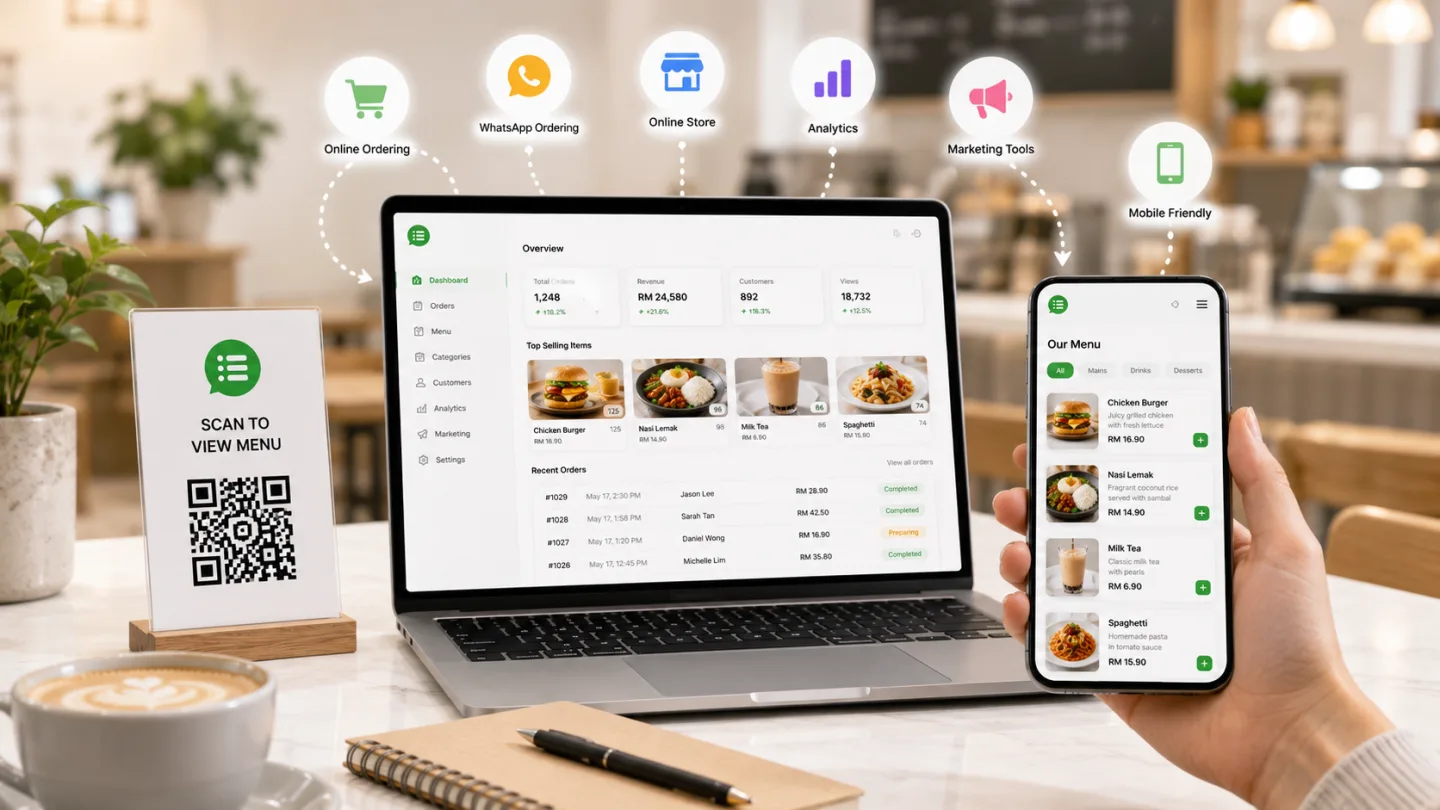
The three things WhatsMenu is built around
WhatsMenu is made of three core pieces. Everything else in the platform is an add-on built on top.
1. A catalog
A structured list of what you sell — categories, products, prices, photos, optional sizes and add-ons. Edit it from a phone or laptop, change a price once, see it update everywhere a customer might look. The catalog model is general-purpose: it works for menu items, retail SKUs, services, appointments, packages, properties, vehicles, or anything else that fits a "you sell this, customer chooses, customer pays" pattern.
2. A storefront
A public web page at your own subdomain — your-business.whatsmenu.page (or a custom domain). Customers visit it, browse your catalog, add items to a cart, and check out. No app to download, no account required to buy, works on any phone made in the last decade.
3. An orders board
Where every new order lands. You see the items, the customer, the payment method, the delivery address, the requested time. You confirm it, mark it in progress, mark it ready, mark it delivered. Each step can ping the customer over WhatsApp so they always know what's happening.
That's it. Catalog → Storefront → Orders. Once you've understood those three boxes, you've understood the platform.
How does WhatsMenu work? Five steps from signup to first order
WhatsMenu's onboarding is built so an owner can go from signup to receiving real orders in a single afternoon.
-
Sign up and pick your storefront address. Open whatsmenu.page/new, enter your business name, email, and a mobile number. Choose a subdomain —
your-name.whatsmenu.page— that customers will see on receipts, business cards, and Google. Confirm your email. - Tell WhatsMenu about your business. Logo, opening hours, time zone, language, currency, address. About fifteen minutes if your branding is ready.
- Build your catalog. Add the categories that fit your business — Coffee · Tea · Pastries, or Haircuts · Color · Treatments, or Power Tools · Hand Tools · Fasteners — then your products with photos and prices. The first dozen products take the longest; after that you'll fly through.
- Set how customers pay and receive. Turn on the payment methods you'll accept (cash, bank transfer, online card). Turn on delivery, pickup, in-house — or any combination. If you deliver, define your delivery areas and fees. Connect WhatsApp so order alerts ping the right phone.
- Share your link. Put your storefront URL in your Instagram bio, on your Facebook page, in your Google Business profile, and in your WhatsApp status. Download the QR code from Settings → Share and print it on packaging, table cards, business cards, and the shop door.
A focused afternoon for setup, a few days for catalog photos, and real orders by the end of the week.
What you can do with WhatsMenu
Beyond "take an order online", here's a tour of what merchants actually build with the platform. Not every feature is for every business — pick the ones that match what you do.
- Run a real catalog with variations and add-ons — three sizes of a flat white, basic vs premium haircuts, three bolt lengths, a "rush" service upgrade. Customers see clean pickers; you see the right line items on the order.
- Take orders 24/7 — turn on scheduled orders and customers place a midnight order for tomorrow's 11 a.m. pickup. You wake up to a prep list, not a stack of late-night DMs.
- Put a QR code on every table, bag, or business card — the same code that customers scan at your shopfront also works on the packaging that goes home with them, so repeat orders cost nothing extra to enable.
- Build delivery zones that match how you actually deliver — charge $5 within 3 km, $8 within 5 km, free above $50, no delivery to certain postcodes. Or skip named zones entirely and let the platform charge by GPS distance from your address.
- Use WhatsApp the way it should be used — a new order pings your team's WhatsApp; status changes ping the customer. Nobody refreshes a page or guesses whether an order went through.
- Run dine-in or on-site ordering with a floor plan — customers at table 4 scan the QR on the menu card, order from their phone, and the order lands in the kitchen tagged "Table 4".
- Push tickets to a kitchen display screen — hang a monitor in the kitchen or behind the bar; new tickets appear instantly and the team marks each one ready when it's done.
- Run a Cloud POS for walk-ins — the same catalog you sell online powers a browser-based register for counter, dine-in, takeaway, and delivery sales. No dedicated hardware to install, no separate till to reconcile.
- Reward repeat customers with coupons or loyalty points — first-time discount codes, segment-specific promos, points per order, stamps that earn a freebie.
- Run multiple languages on one storefront — a salon in Kuala Lumpur can run English, Malay, and Mandarin side by side; a bakery in São Paulo can run Portuguese and English.
- Open multiple storefronts as you grow — each branch or sub-brand runs as its own storefront with its own subdomain, opening hours, and delivery zones.
- Run a showcase or quote-only catalog for high-ticket sales — real estate listings, used-car inventories, B2B equipment catalogs. The "Order" button becomes a structured inquiry; you take the conversation off-platform to close.
- Get real reports on what's selling — top items by revenue, slow movers, peak hours, average ticket size, repeat-customer rate.
- Drive your own deliveries with a driver app — your in-house drivers get a mobile app for pickups, dropoffs, navigation, and live status updates; their location streams back to your dashboard.
- Hand delivery off to a third-party courier when needed — Lalamove for on-demand pickup in supported regions, Detrack for dispatching delivery jobs to an external fleet with status sync back into WhatsMenu.
Settings → Apps has dozens more modules you can add as you grow.
Who is WhatsMenu for?
The sweet spot is a local business whose customers live in roughly the same city, region, or country, who wants its own catalog and direct customer relationship, and who would rather pay a flat subscription than a commission on every order.
Industries WhatsMenu fits cleanly:
- Food — restaurants, cafés, bakeries, dessert shops, ghost kitchens, juice bars, food trucks, caterers, butchers, fishmongers, specialty grocers
- Retail — boutiques, gift shops, hardware stores, plant shops, bookshops, toy stores, electronics resellers, pharmacies
- Health and beauty — salons, barbers, spas, nail bars, clinics, dentists, optometrists, physiotherapists, tattoo studios
- Services — tutors, cleaning, laundry, repair shops, mechanics, tailors, photographers, event planners
- Automotive — car dealerships, motorbike shops, parts suppliers, service centers
- Real estate and high-ticket — property listings, broker portfolios, B2B equipment catalogs
- Personal brands — coaches, consultants, designers, freelancers, vCard-style profiles for individuals
If your business is somewhere in that range and you sell to humans who live or work near you, WhatsMenu is built to fit.
What makes WhatsMenu different from other platforms?
The five points where WhatsMenu's design diverges from a generic e-commerce platform:
- Built for local merchants, not global stranger commerce. Most e-commerce platforms assume you're shipping a parcel to an anonymous buyer anywhere in the world. WhatsMenu assumes your customers are already nearby — they know your name, want to order in their language, pay how they pay locally, and receive the same day. Every feature points back to that assumption.
- The features local merchants actually need are already built in. Delivery zones with free-shipping thresholds. Time slots. In-house and dine-in flows. QR-code ordering. A kitchen display. A Cloud POS. A driver app. Multi-language storefronts. Loyalty. Coupons. WhatsApp notifications. On most platforms, those are paid third-party add-ons stacked on top of the platform fee. On WhatsMenu, they're modules you turn on from Settings → Apps, on the same subscription.
- Flat subscription, no per-order commission. Marketplaces take a cut of every sale. Delivery apps take more. WhatsMenu charges a flat subscription, so your platform cost stays predictable as you grow instead of scaling with revenue.
- The customer is yours, not the platform's. Every order brings the customer's contact details, address, and preferences into your customer list, exportable and reusable. On a marketplace or delivery app, that data is the platform's asset — the platform can stop showing your business to those customers tomorrow and you'd never know.
- Multi-industry by design. The same platform runs a bakery, a hardware store, a salon, a clinic, a tutoring service, a real-estate agency, and a one-person freelance studio. The catalog model is general — categories, products, variations, add-ons — not hard-coded to dishes and modifiers.
What WhatsMenu is not — the honest tradeoffs
An explainer that lists only advantages is a sales pitch, not an explainer. Here is what WhatsMenu does not try to do:
- It is not a global marketplace. No anonymous shopper is searching "buy cake" and finding your shop. You bring the audience — through your social channels, your Google Business profile, walk-by traffic, word of mouth, or paid ads.
- It is not a freeform website builder. The storefront uses a customizable template with your brand, photos, and copy — but the structure (categories, products, cart, checkout) is shared across every WhatsMenu storefront. That consistency is what lets customers learn one storefront and feel at home on the next.
- It is not a general-purpose CRM. WhatsMenu stores your customer list and order history. It's not a sales-pipeline tool with email sequences and lead scoring.
- It is not a scan-and-bag retail POS for high-volume grocery. Where a cashier scans 50 items per minute, cloud round-trips add latency. WhatsMenu's Cloud POS fits catalog-selection businesses (food, services, B2B walk-ins), not big-format grocery checkout.
- It is not a WhatsApp marketing-blast tool. WhatsApp in WhatsMenu is transactional — order confirmations, status updates, delivery alerts. It is not for broadcasts, segmented campaigns, or re-engagement messaging.
What WhatsMenu asks of you in return: you bring the customers, you learn one platform, you keep your catalog up to date. Those are the only ongoing demands.
Frequently asked questions
Do I have to be technical to use WhatsMenu?
No. If you can use Instagram, you can run a WhatsMenu storefront. Setup happens entirely in a browser — nothing to install on a server, nothing to host.
Will my customers need to download an app?
No. The storefront is a regular web page that works on any modern phone browser. There is a vendor app for you (to manage orders on the go) and a driver app for your in-house drivers, but customers just tap a link.
Can I keep my Instagram, Facebook, and Google presence?
Yes — and you should. Your WhatsMenu storefront becomes the link in your bio, the button on your Facebook page, and the website on your Google Business profile. Social channels bring the audience; WhatsMenu takes the order. See the detailed comparisons for Instagram Shop / Meta Catalog, Google Business Profile, and WhatsApp Business Catalog.
What payment methods can my customers use?
Cash, bank transfer, and a range of online payment providers depending on your country (Stripe, PayPal, and country-specific options for Brazil, Malaysia, India, and other markets). You enable the ones you want.
Can I sell services and appointments, not just physical products?
Yes. Services, appointments, packages, and quoted items all work. The catalog is general-purpose, not food-specific.
Can I run my storefront in a language other than English?
Yes. WhatsMenu supports many storefront languages including all major Latin American, Asian, and European markets. You can run a multi-language storefront for customers who speak different languages.
Does WhatsMenu take a cut of my sales?
No per-order commission. The model is a flat platform subscription, so a busier month doesn't mean a higher platform bill.
Can I leave and take my data with me?
Yes. You can export your product list, customer list, and order history at any time.
What's the difference between WhatsMenu and the delivery apps (Uber Eats, iFood, GrabFood)?
A delivery app brings you customers from its own audience in exchange for a per-order commission, and the customer becomes the app's customer, not yours. WhatsMenu is your channel — repeat customers, no commission, customer data is yours. Most food merchants use both: delivery apps for acquisition, WhatsMenu for repeat business. For broader platform alternatives, see WhatsMenu vs Shopify, vs Wix, or vs WooCommerce.
Can I run more than one storefront from one place?
Each subdomain is one storefront. For a second branch or sub-brand, set up a separate account with its own subdomain, its own opening hours, and its own delivery zones.
Bottom line
WhatsMenu is the online storefront a local business builds when it wants to take orders properly, without a marketplace skimming the top and without paying for a separate app for every operational feature.
The platform's job is the storefront, the cart, the checkout, the delivery zones, the time slots, the QR codes, the kitchen display, the Cloud POS, the WhatsApp notifications, and the customer list. Your job is the catalog, the customers, and the craft.
If that division of labor matches the way you actually run your business, you can be live in an afternoon.
Sign up free at whatsmenu.page/new, pick your subdomain, and place a test order on your own storefront before lunch.
Already on another platform? See the step-by-step migration guides: from Shopify, from WooCommerce, from Linktree, or from Shopee.